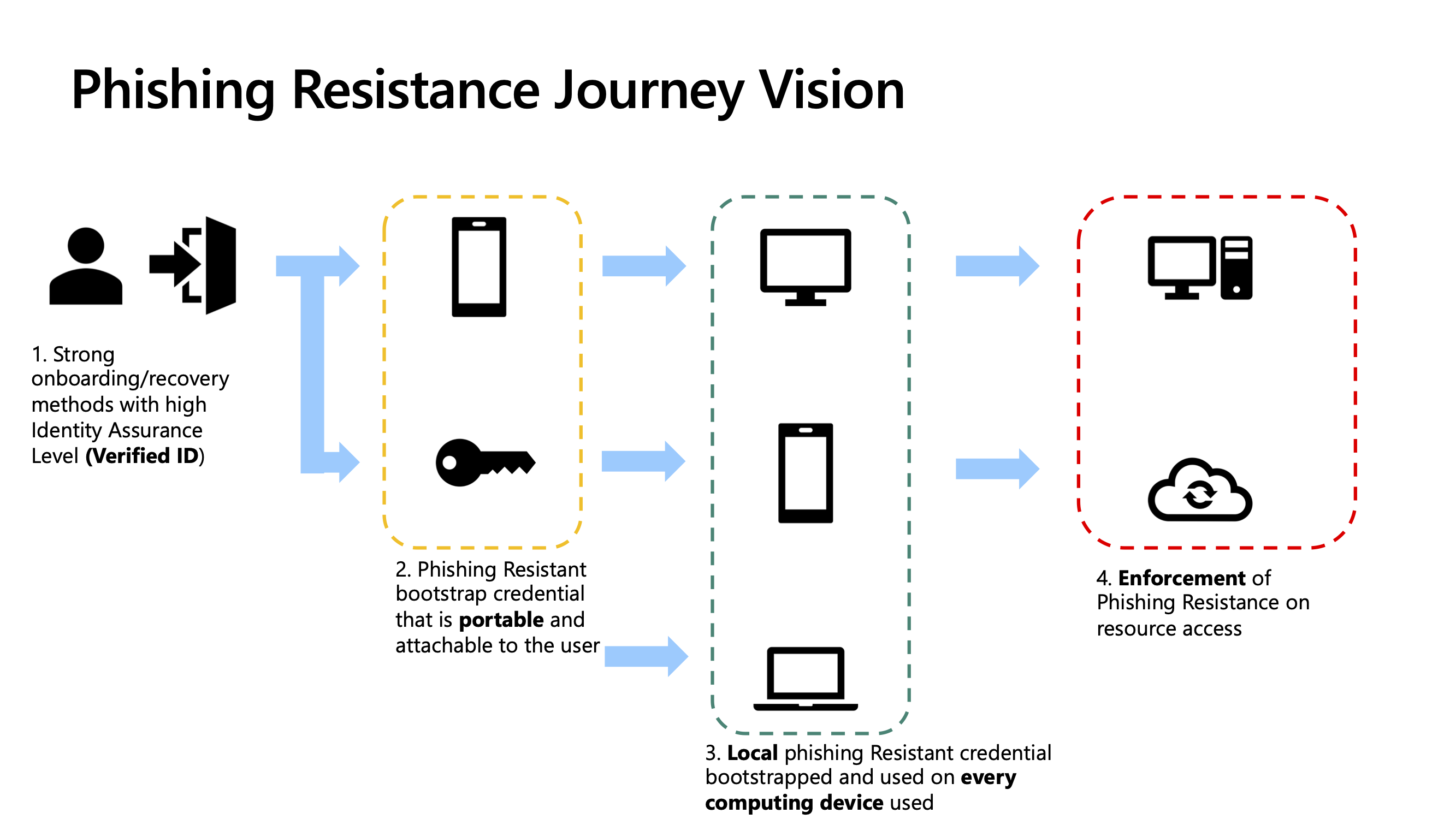
Microsoft Phishing Resistance: Unlocking the Power of Passwordless Authentication
The perennial threat of phishing attacks continues to plague organizations, leveraging social engineering tactics to trick users into divulging sensitive credentials. Traditional password-based authentication, while foundational, remains a significant vulnerability. Microsoft has aggressively championed passwordless authentication as a robust defense against these persistent threats. This paradigm shift fundamentally alters the authentication landscape, moving away from static, easily compromised passwords towards dynamic, multifactorial, and inherently more secure methods. Understanding the mechanics, benefits, and implementation of Microsoft’s passwordless solutions is crucial for any organization seeking to bolster its cybersecurity posture.
Passwordless authentication, at its core, eliminates the reliance on a user remembering and typing a password. Instead, it leverages a variety of cryptographic methods and device-bound authenticators to verify user identity. This eliminates the primary vector for credential theft – phishing. When there’s no password to phish, the effectiveness of phishing attacks targeting credential harvesting plummets. Microsoft’s approach is deeply integrated into its identity and access management ecosystem, primarily revolving around Azure Active Directory (Azure AD), now Microsoft Entra ID. This integration allows for a seamless transition to passwordless experiences across a wide range of Microsoft services and applications, as well as third-party applications integrated with Azure AD. The core principle is to replace the "something you know" (password) with a combination of "something you have" (a registered device or authenticator app) and "something you are" (biometrics), or a combination thereof.
One of the cornerstone technologies enabling Microsoft’s passwordless future is the Authenticator app. This mobile application, available for iOS and Android, acts as a secure authenticator for Microsoft accounts. Instead of entering a password, users receive a push notification on their registered device when attempting to log in. This notification prompts them to approve or deny the sign-in request. This is known as number matching or passwordless sign-in. In the case of number matching, the user is presented with a unique number on the login screen of the service they are trying to access, and they must select the corresponding number within the Authenticator app. This significantly mitigates the risk of “MFA fatigue” attacks, where attackers repeatedly bombard users with MFA prompts, hoping they will eventually click "approve" out of frustration. By requiring explicit confirmation and often a contextual element like number matching, the user is forced to actively engage with the authentication process, making it far harder for an attacker to exploit. The app also supports biometric authentication (fingerprint or facial recognition) on the device, adding another layer of security. This move away from SMS-based multi-factor authentication (MFA), which is susceptible to SIM-swapping attacks, is a critical advancement.
Another pivotal element is Windows Hello for Business. This feature allows users to sign in to their Windows devices and access cloud resources using biometric authentication (fingerprint or facial recognition) or a PIN. Windows Hello for Business utilizes hardware-backed security keys, such as Trusted Platform Modules (TPMs), to securely store authentication credentials, making them virtually impossible to extract from the device. When a user signs in with Windows Hello for Business, their device establishes a secure, encrypted channel with Azure AD. The authentication process involves a combination of the user’s biometrics (or PIN) and the presence of a secure hardware component on the device. This is a powerful example of device-bound authentication, ensuring that the identity is tied to a specific, trusted hardware environment. This dramatically reduces the risk of credential theft, as even if a device is compromised, the biometric data and the associated private keys remain protected.
The broader framework underpinning these passwordless capabilities is Microsoft Entra ID. As the central identity and access management service, Entra ID orchestrates the entire authentication and authorization process. It manages user identities, their authentication methods, and their access policies. By configuring passwordless authentication within Entra ID, organizations can enforce these more secure methods for all their users and applications. This centralized management simplifies deployment, monitoring, and policy enforcement, ensuring a consistent security posture across the organization. Entra ID’s ability to support various authentication methods, including passwordless options, allows for a gradual and flexible migration strategy. Organizations can pilot passwordless sign-in with specific user groups or applications before a full rollout.
The benefits of adopting Microsoft’s passwordless authentication are manifold and directly address the weaknesses of password-centric security models.
Enhanced Security: The most significant advantage is the drastic reduction in vulnerability to phishing attacks. Without passwords to steal, credential harvesting becomes largely ineffective. Passwordless methods are also inherently more resistant to brute-force attacks, dictionary attacks, and credential stuffing attacks, as they don’t rely on guessing or cracking static passwords. The use of device-bound credentials and multifactorial verification (even if the factors are not explicitly perceived as such by the user) significantly raises the bar for attackers.
Improved User Experience: For end-users, passwordless authentication often translates to a smoother and faster login experience. No more memorizing complex passwords, no more password reset requests due to forgotten credentials. A simple tap of a fingerprint or a quick glance at a device can grant access. This not only boosts productivity but also reduces the frustration associated with traditional authentication methods. The reduction in help desk tickets related to password resets can also lead to significant operational cost savings.
Reduced Administrative Overhead: Eliminating password management significantly lightens the load on IT and help desk staff. The time spent on password resets, account lockouts due to incorrect password attempts, and managing password policies can be redirected to more strategic security initiatives. This operational efficiency is a compelling reason for many organizations to embrace passwordless solutions.
Compliance and Regulatory Benefits: Many industry regulations and compliance frameworks are increasingly emphasizing strong authentication and data protection. By implementing passwordless authentication, organizations can demonstrate a commitment to robust security practices, which can be crucial for meeting compliance requirements and passing audits. The inherent security improvements can directly contribute to meeting standards related to data privacy and unauthorized access prevention.
Mitigation of Credential Stuffing and Account Takeover: Credential stuffing, where attackers use lists of stolen credentials from one breach to attempt access to other services, is a widespread problem. Passwordless authentication effectively neutralizes this threat by eliminating the shared credential as a point of attack. Similarly, account takeover (ATO) is significantly harder when a password is not the primary authentication factor.
Implementing passwordless authentication within the Microsoft ecosystem involves several key steps and considerations.
Prerequisites:
- Microsoft Entra ID (formerly Azure AD): A Microsoft Entra ID tenant is essential. The chosen passwordless authentication methods will be configured and managed within Entra ID. Different license tiers of Entra ID offer varying levels of functionality, so it’s important to ensure the chosen license supports the desired passwordless features.
- User Devices: Users will need compatible devices, such as smartphones for the Authenticator app or Windows devices capable of supporting Windows Hello for Business.
- Network Connectivity: Reliable network connectivity is required for the authentication process, especially for push notifications and device synchronization.
Key Implementation Steps:
-
Enable Passwordless Sign-in for Microsoft Authenticator: This is a foundational step. Administrators can enable this feature within the Entra ID authentication methods policy. Once enabled, users can register their Authenticator app and set it up for passwordless sign-in. The policy can be configured to target all users, specific groups, or exclude certain users. Conditional Access policies can also be leveraged to enforce the use of the Authenticator app for certain scenarios.
-
Configure Windows Hello for Business: For Windows 10 and Windows 11 devices, Windows Hello for Business can be deployed. This typically involves configuring Group Policy or Microsoft Intune policies. The deployment can be cloud-only, hybrid, or on-premises, depending on the organization’s existing infrastructure. Ensuring devices have TPM chips is a crucial hardware requirement for robust security.
-
Leverage Conditional Access Policies: Conditional Access is the backbone of identity and access management in Entra ID. Administrators can create policies to enforce passwordless authentication for specific applications, user groups, locations, or device states. For example, a policy could mandate passwordless sign-in for access to sensitive cloud applications, or require a passwordless method when accessing from untrusted networks. This allows for a phased rollout and granular control.
-
Integrate Third-Party Applications: Entra ID supports single sign-on (SSO) for a vast number of third-party applications. Once a user is authenticated using a passwordless method to Entra ID, they can seamlessly access integrated applications without further authentication prompts. This extends the benefits of passwordless authentication beyond Microsoft’s own services.
-
User Onboarding and Training: Effective user onboarding is critical for the successful adoption of passwordless authentication. Users need to understand how to set up their Authenticator app, register their biometrics for Windows Hello, and what to do if they lose their device or encounter issues. Clear communication and training materials can significantly reduce user friction and support requests.
-
Monitoring and Auditing: Regularly monitor authentication logs within Entra ID to track usage of passwordless methods, identify any suspicious activity, and ensure the security policies are being adhered to. Auditing the effectiveness of the implemented passwordless solutions is crucial for continuous improvement.
Challenges and Considerations:
- Device Loss or Compromise: While passwordless methods are more secure, scenarios involving lost or stolen devices need to be carefully managed. Entra ID policies can enforce device compliance and allow for remote wiping of company data. User education on reporting lost devices immediately is paramount.
- User Resistance: Some users may be resistant to change or find the new authentication methods initially confusing. Comprehensive training and support are essential to overcome this. The perceived complexity of some passwordless methods, like number matching, can sometimes be a hurdle.
- Legacy Systems: Older applications or systems that do not support modern authentication protocols may require workarounds or integration layers, potentially limiting the scope of a full passwordless deployment.
- Hardware Requirements: Windows Hello for Business relies on specific hardware capabilities (e.g., TPM chips). Organizations need to assess their hardware inventory and plan for upgrades if necessary.
- Phishing Evolved: While passwordless authentication significantly reduces phishing risk, attackers will continue to adapt. Social engineering tactics might shift towards tricking users into approving malicious authentication requests or exploiting other vulnerabilities. Continuous vigilance and security awareness training remain crucial.
The future of authentication is undeniably passwordless, and Microsoft is at the forefront of this transformation. By embracing solutions like the Authenticator app and Windows Hello for Business, integrated within the robust framework of Microsoft Entra ID, organizations can build a formidable defense against phishing and other credential-based threats. The move towards passwordless is not merely an incremental security upgrade; it’s a fundamental shift that enhances security, improves user experience, and streamlines IT operations, positioning businesses for a more secure and efficient digital future. The ability to bypass the inherent vulnerabilities of passwords and adopt dynamic, context-aware authentication methods is no longer a futuristic aspiration but a present-day necessity for combating sophisticated cyber threats. The ongoing evolution of Microsoft’s identity platform promises further innovations, solidifying passwordless authentication as the cornerstone of modern cybersecurity strategies.

